

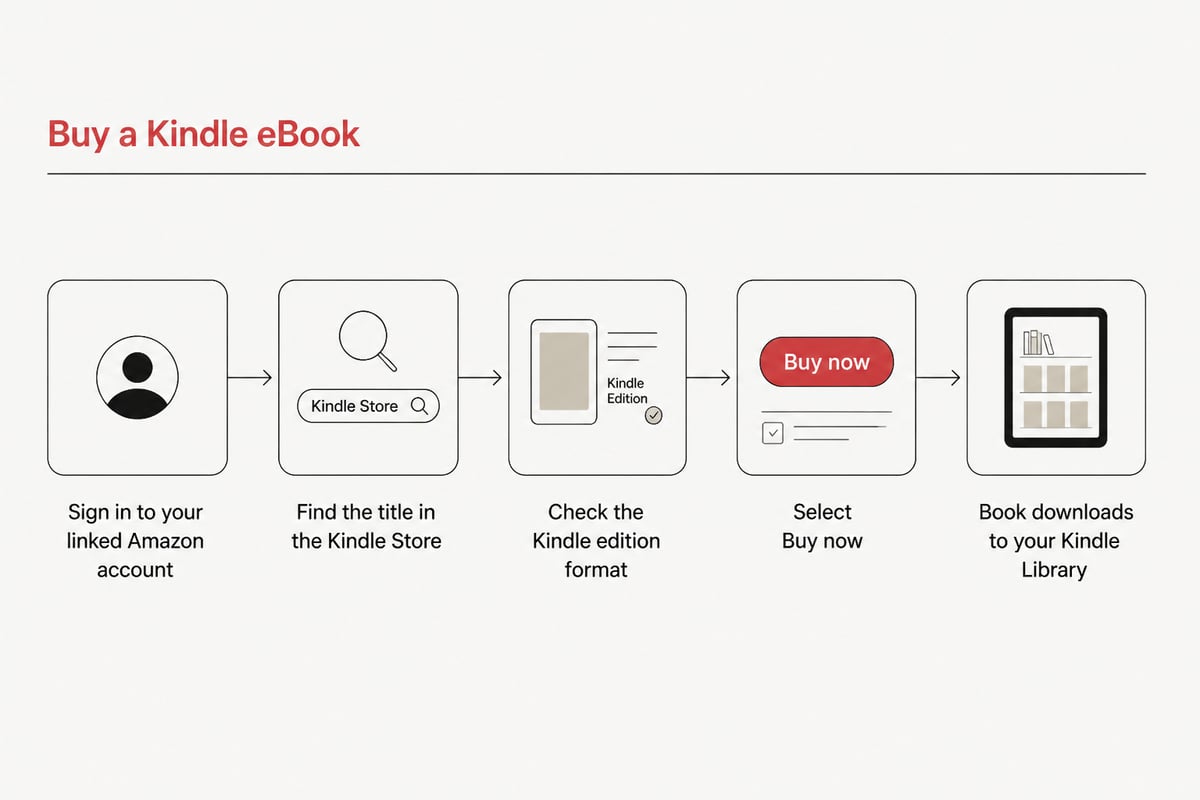
An Amazon ebooks buy takes a few minutes: sign in to the Amazon account linked to your Kindle device or app, find the title in the Kindle Store, and select "Buy now." The book then downloads to your Kindle Library, ready to read. This guide walks through each step, explains what Kindle books cost, compares Kindle Unlimited with buying outright, and covers what to do when a purchase fails to appear. It also explains what happens to your books after you buy them, which matters if you want to read on more than one kind of device.
How to Buy a Kindle eBook on Amazon
The fastest route is to buy directly on your Kindle device or through Amazon.com in a web browser, and both end with the book in your Kindle Library.
On a Kindle device, About Amazon describes the process this way: sign in with the Amazon account linked to the device, find the title in the Kindle Store, and select "Buy now." The book downloads to the Kindle Library. For the Kindle app on a phone or tablet, the same source explains that you open Amazon.com in a web browser, select the Kindle edition, and complete the purchase. The title then appears in the app's Library and on any Kindle device registered to the same account.
Follow these steps for a smooth purchase:
- Confirm you are signed in to the correct Amazon account, since purchases attach to the account that makes them.
- Search by title, author, or category in the Kindle Store.
- Check that the format listed on the product page is the Kindle edition rather than a paperback or hardcover.
- Review the price, the sample option, and the description before buying.
- Select "Buy now" and wait for the download to finish.
A useful habit is to download the free sample first. Samples let you judge the writing, the formatting, and the pacing before you spend anything, which is especially helpful for long nonfiction titles.
How Much Are Books on Kindle?
Kindle books are priced by each publisher or author, so there is no single standard price, and the amount you see on the product page is the amount you pay.
Prices vary widely across the catalog. Backlist classics and independent titles often cost far less than new releases from major publishers, and some books are offered free. Because pricing changes frequently, the product page is the only reliable source for a current figure. Checking it just before you buy, and again if you are watching a title for a drop, is the most dependable approach.
Several factors influence what you pay:
- Release timing: New hardcover-era releases tend to carry higher digital prices than older titles.
- Publisher decisions: Each publisher sets its own digital price, which is why two similar books can differ noticeably.
- Promotions: Temporary discounts appear on selected titles, so patient readers often save.
- Series position: First books in a series are frequently discounted to draw readers into later volumes.
For avid readers who buy many books a year, small differences add up quickly. That is the main reason to compare prices across stores before committing to a purchase.
Is Kindle Unlimited Worth the Cost?
Kindle Unlimited is worth it only if you read enough titles from its catalog each month to beat the cost of buying those books individually.
It works as a subscription, so you borrow titles rather than own them. If you finish several books a month and your tastes match what the catalog offers, a subscription can come out ahead. If you read one or two books a month, or if you want specific new releases, buying is usually the better value. Borrowed titles also disappear from your device when you cancel or return them, while purchased books stay yours.
A simple test helps you decide. Look at the last three months of your reading, count the books you finished, and check how many of them are available in the subscription catalog. If most are not, the subscription will not serve you well.
How to See Kindle Unlimited History
Your borrowing history lives in your Amazon account under the Content Library or the Manage Your Content and Devices area. From there you can review which titles you borrowed and which are still active. Menu names change occasionally, so look for the content and devices section of your account settings if a label looks different.
Why Isn't My Book Showing Up in My Kindle Library?
A missing book is usually a sync or account issue, and the fix is typically a manual sync or a check that you are signed in to the account that bought the title.
Work through these checks in order:
- Confirm the purchase appears in your Amazon order history under the correct account.
- Make sure your device or app is connected to Wi-Fi or mobile data.
- Run a manual sync from the device or app menu.
- Check that the device is registered to the same account used for the purchase.
- Restart the app or device and look again.
If the order shows as complete but the book still does not appear, contacting Amazon customer service resolves most cases. Keep your order number handy, since it speeds up the conversation considerably.
Sharing Kindle Books With Family
Kindle books can be shared within a household, though the rules depend on how the account is set up.
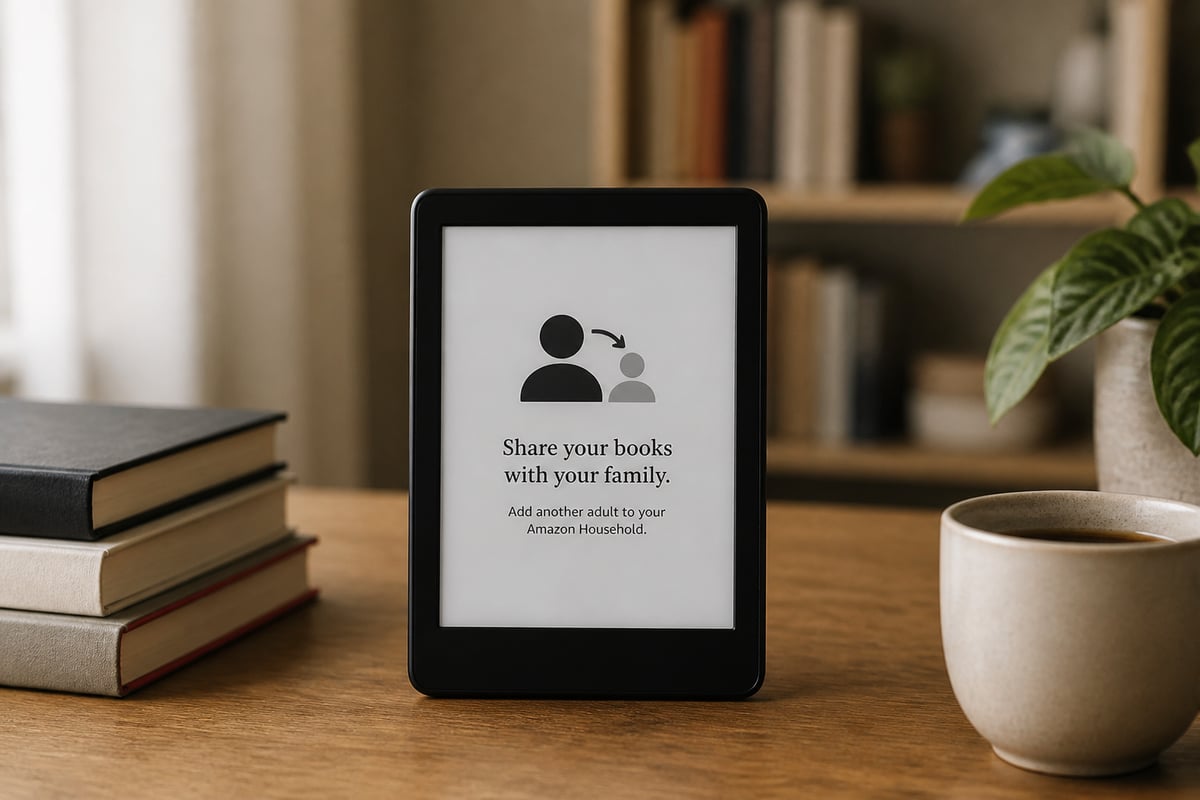
About Amazon explains Kindle book sharing through Amazon Household and Family Library, including how to manage the titles you share. This is worth setting up if several readers in one home want to enjoy the same purchases without buying duplicates. A parent who buys a popular novel, for example, can make it available to a partner or older child instead of paying for a second copy. Because everything is tied to your Amazon account, it helps to decide up front which titles you want to share and which you prefer to keep in your own library. Review those choices in the account settings where Household and Family Library are managed, and revisit them whenever someone joins or leaves the household. Sharing is tied to the Amazon system, so it does not extend to readers outside that household arrangement. A friend across town or a relative in another home cannot borrow your titles this way, and a file bought in an open format elsewhere follows entirely separate rules.
What You Actually Own When You Buy a Kindle Book
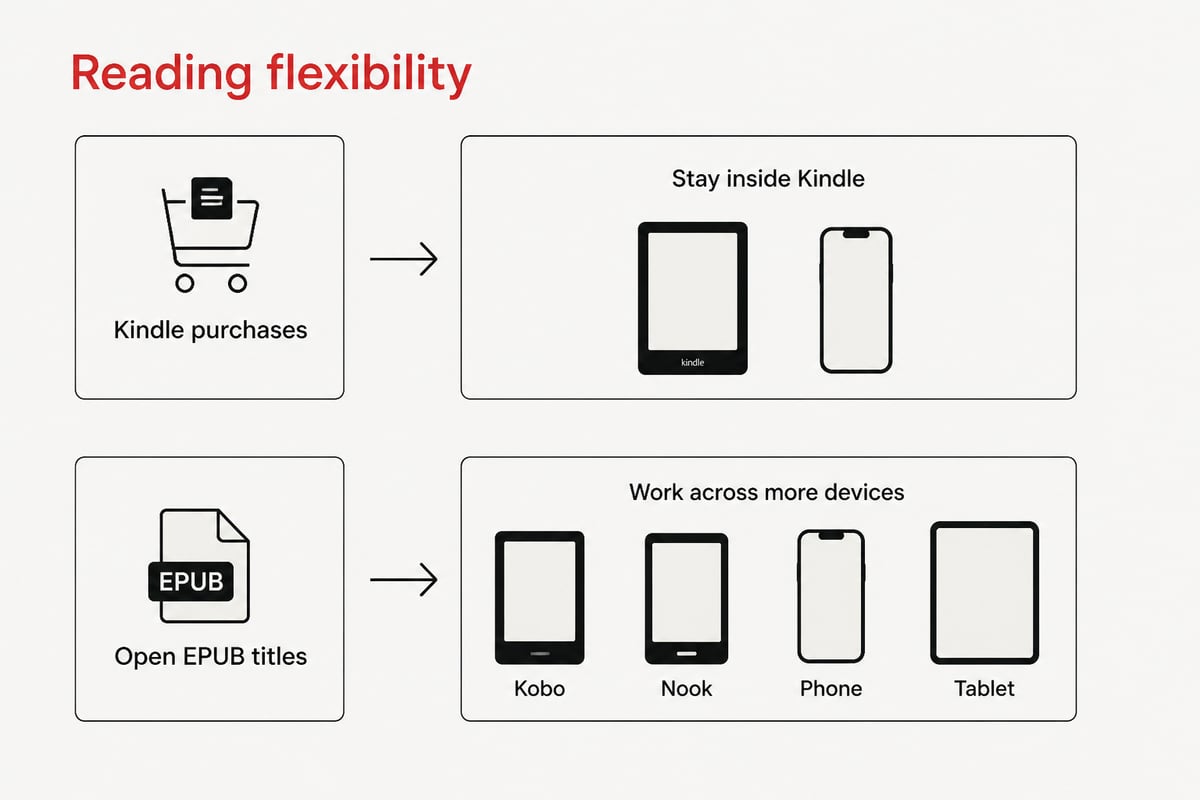
When you buy from Amazon, you buy access inside the Kindle ecosystem, and that shapes where and how you can read the book later.
Kindle purchases live in your Amazon account and are built for Kindle devices and the Kindle app. Moving them to a different brand of reader is not straightforward, which can matter if you ever switch devices. Readers who prefer flexibility often look for stores that deliver the open EPUB format, since that format opens on a wide range of readers and apps.
This is where it helps to compare stores before settling on one place. Tell eBook delivers titles in open EPUB, which can be read on many devices and apps. You buy once and keep your books, with instant download. If you want a wider view of where to shop, the guide to the best place to buy ebooks breaks down what to look for, and the page on how to buy ebooks for Kindle covers reading purchased titles on that hardware.
Comparing Your Options Before You Buy
Comparing a few buying routes takes a minute and can save real money over a year of reading.
| Option | How you pay | What you keep | Best use |
|---|---|---|---|
| Buy a Kindle book | Per title | Access in your Amazon account | Specific titles you want to own |
| Kindle Unlimited | Monthly subscription | Nothing after you cancel | High-volume readers in the catalog |
| Open-format store purchase | Per title | The file, readable on many devices | Readers who use more than one device |
Price is only part of the picture. Think about how many devices you read on, whether you plan to keep books for years, and whether you want to listen to audiobooks alongside your reading.
Finding Lower Prices on Bestsellers
Avid readers who want to cut costs should compare the same title across stores before buying, since digital prices differ by retailer.
Tell eBook's Discount eBooks collection offers bestselling eBooks with instant EPUB or PDF download. Browsing by category makes it easy to find fiction, business, comics, or biographies without paging through unrelated results. For an idea of the range, you can look at a series entry like Platform Decay, book 8 of The Murderbot Diaries, or a biography such as Benjamin Franklin: The First American. Product pages are the place to confirm current pricing and details before you buy. A practical routine is to open the title in two stores side by side, note the listed price, and confirm that the file format matches the device you read on. If you follow a series, check each volume separately, because the price of book 8 can differ from the price of book 1. Readers who buy several titles a month often find that a few dollars saved per book adds up to a meaningful sum by year's end.
Practical Tips for Every eBook Purchase
A few habits make any eBook purchase safer, cheaper, and easier to manage later.
- Read the sample: It reveals formatting problems and writing style before you commit.
- Verify the edition: Make sure you are buying the digital version, not a print copy.
- Track your account: Buying from the wrong account is the most common reason a book seems to vanish.
- Back up your library: Know where your purchased files live and how to download them again.
- Compare before you pay: A quick check of a second store can reveal a lower price on the same title.
If you also enjoy listening, remember that audiobooks follow different rules than eBooks. Confirm the format on the product page, then test playback on your device the same day you buy.
FAQ
Can I buy a Kindle book without a Kindle device?
Yes. You can buy the Kindle edition through Amazon.com in a web browser, and it then appears in the Kindle app on your phone or tablet. The app Library syncs with any Kindle device registered to the same account.
Do I keep a Kindle Unlimited book after I cancel?
No. Titles borrowed through the subscription are removed once you cancel or return them, so you only retain books you purchased outright. If you want to keep a title permanently, buy it instead of borrowing it.
What should I do if the wrong edition was purchased?
Check the product page and your order history first to confirm which edition you bought. Then contact Amazon customer service with your order number, since policies on digital purchases depend on the circumstances. Reviewing the format before you select "Buy now" prevents most of these mix-ups.
Before your next purchase, run a quick check of the same title in two different stores and compare the price and the file format you receive. If you want lower prices on bestsellers, instant downloads, and open EPUB files you keep for good, browse the collection at Tell eBook, where you can go to the shop and find your next read in fiction, business, comics, or biographies.