

To buy digital books on Amazon, sign in to your Amazon account, open the Kindle Store from a browser, a Kindle e-reader or the Kindle app, choose a title, and select Buy now or Buy with 1-Click. The book is delivered to your Kindle library within moments, ready to read on any device signed in to the same account.
The process is simple, but a few details change what you actually own and where you can read it. Kindle purchases arrive in Amazon's own format, which matters if you ever want to move your library to another reader. This guide walks through each purchase method, explains the settings that prevent accidental orders, and covers a lower-priced option for readers who prefer open files.
How to Buy Digital Books on Amazon Step by Step
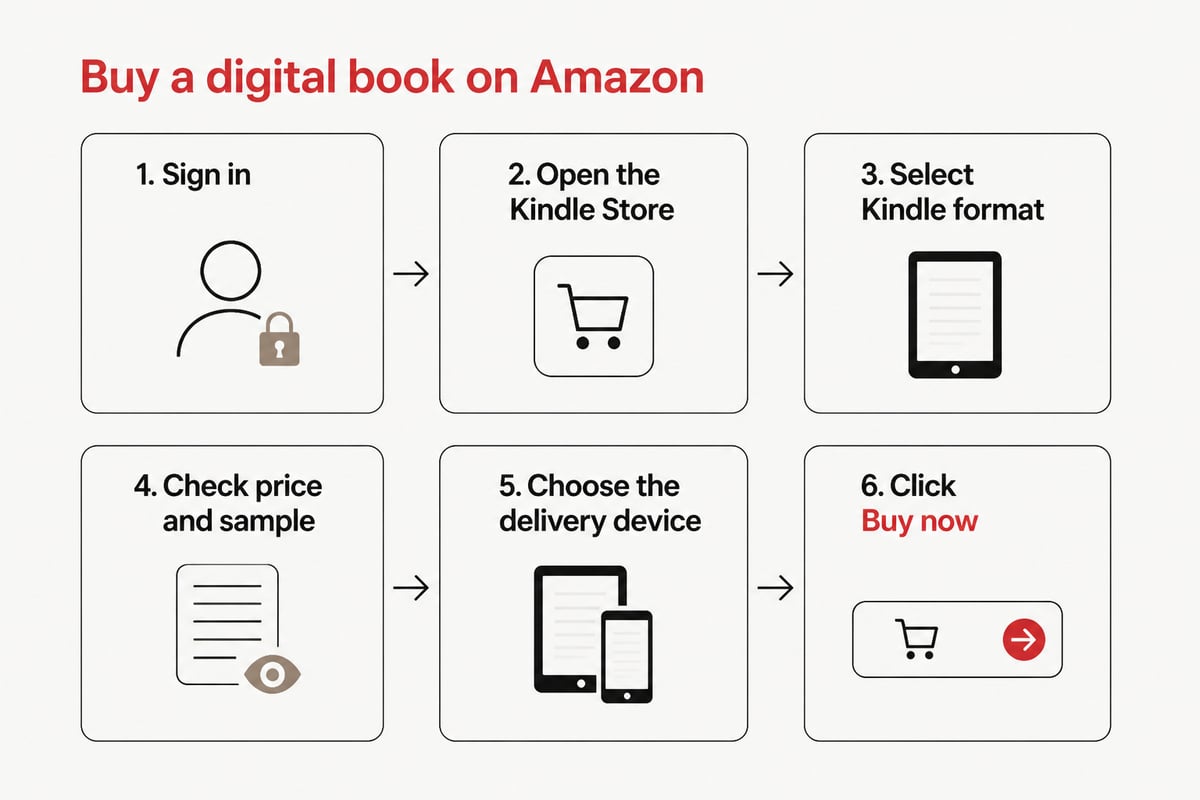
The fastest route is the Kindle Store on Amazon's website: search for a title, check that the listing says "Kindle Edition," and click Buy now. Here is the full sequence:
- Sign in to your Amazon account, or create one if you do not have one yet.
- Open the Kindle Store from the Amazon menu, or type a title or author into the search bar.
- Select the Kindle format on the product page. Print and audiobook options appear alongside it, so confirm the format before purchasing.
- Review the price, the page count and the sample, if one is offered.
- Choose the device or app that should receive the book from the "Deliver to" menu.
- Click Buy now, or Buy with 1-Click if you have enabled it.
Once the order completes, the title appears in your Kindle library. If the book does not show up on a device, open the library and sync it manually.
Buying From a Kindle, the Kindle App or a Browser
You can buy digital books from three places, and each has slightly different behavior. The right choice depends on where you like to browse.
On a Kindle e-reader
Open the Kindle Store from the home screen, search or browse, and tap Buy. The book downloads over Wi-Fi and appears on your home screen. This is the most direct method, because delivery targets the device in your hand.
In the Kindle app
Kindle books can be bought and read through the Kindle app, though availability of the in-app store can vary by platform and region. Availability of the in-app store can vary by platform and region, so if you do not see a Buy button, check the Amazon website in your phone's browser instead.
In a web browser
A desktop or mobile browser gives you the full product page, including reviews, sample chapters and format comparisons. Most readers find this the easiest place to compare editions before committing.
Settings That Prevent Accidental Purchases
Turning off one-tap buying and adding a purchase confirmation are the quickest ways to avoid ordering the wrong book. These settings live under Content and Devices in your Amazon account.
- 1-Click ordering: Convenient, but easy to trigger by mistake, especially on a touchscreen shared with family.
- Parental controls and passwords: On Kindle devices, you can require a password before any purchase.
- Order cancellation window: Amazon allows a Kindle book return within a limited window after purchase in many cases. Check the current return terms on Amazon's help pages, since they can change.
- Payment method: Confirm which card or gift balance is attached to your 1-Click setting so charges go where you expect.
A short review of these options takes a few minutes and can spare you the trouble of requesting a refund later.
Understanding What You Get When You Buy a Kindle Book
A Kindle purchase gives you a license to read the book through Amazon's ecosystem, and the file format is designed for Kindle apps and devices. That is fine if you plan to stay inside Amazon, but it limits flexibility.
Accessibility features add real value here. Assistive Reader offers read-aloud with real-time highlighting on supported Kindle apps and devices, which helps readers who like to follow text while listening. It is a useful reason to stay in the Kindle environment if you rely on that feature.
Before you buy, consider these points:
- Device range: Kindle books read on Kindle e-readers, Fire tablets and the Kindle app for phones and tablets.
- Portability: Moving a Kindle book to a non-Kindle reader is generally not straightforward.
- Lending and sharing: Options depend on the publisher and Amazon's current rules.
Why Some Readers Buy Digital Books Elsewhere
Many avid readers keep a Kindle account but buy from other stores to pay less or to hold files in an open format. The reasons are practical. A catalog of bestsellers is easy to find on Amazon, yet the same titles are often sold elsewhere at lower prices, and an open EPUB file can move between devices without conversion.
Discount eBooks at Tell eBook are one example: bestselling titles at lower prices than major retailers, delivered as instant EPUB or PDF downloads. Because Tell eBook delivers titles in the open EPUB format, they can work on Kobo, Nook, phones and tablets. Eligible eBooks are available for instant download, with no shipping fees or waiting.
If you want to understand the trade-offs in more depth, Tell eBook has a plain explanation of buying eBooks outside Amazon and a look at what makes a good place to buy eBooks.
Kindle Store vs. an Open-Format Store
Comparing the two approaches on the same attributes makes the decision clearer. Use this table as a quick reference.
| Attribute | Amazon Kindle Store | Open EPUB store (such as Tell eBook) |
|---|---|---|
| Typical file format | Kindle format | EPUB |
| Reading devices | Kindle e-readers, Fire tablets, Kindle apps | Kobo, Nook, phones, tablets and EPUB-compatible apps |
| Delivery | Sent to your Kindle library | Instant download |
| Best for | Readers committed to the Kindle ecosystem | Readers who want portable files and lower prices |
Neither choice is wrong. The right one depends on which device you read on and how much you value moving your library freely. For a Kindle owner, Tell eBook also covers the topic directly in its page on buying eBooks for Kindle.
How to Find Books Worth Buying
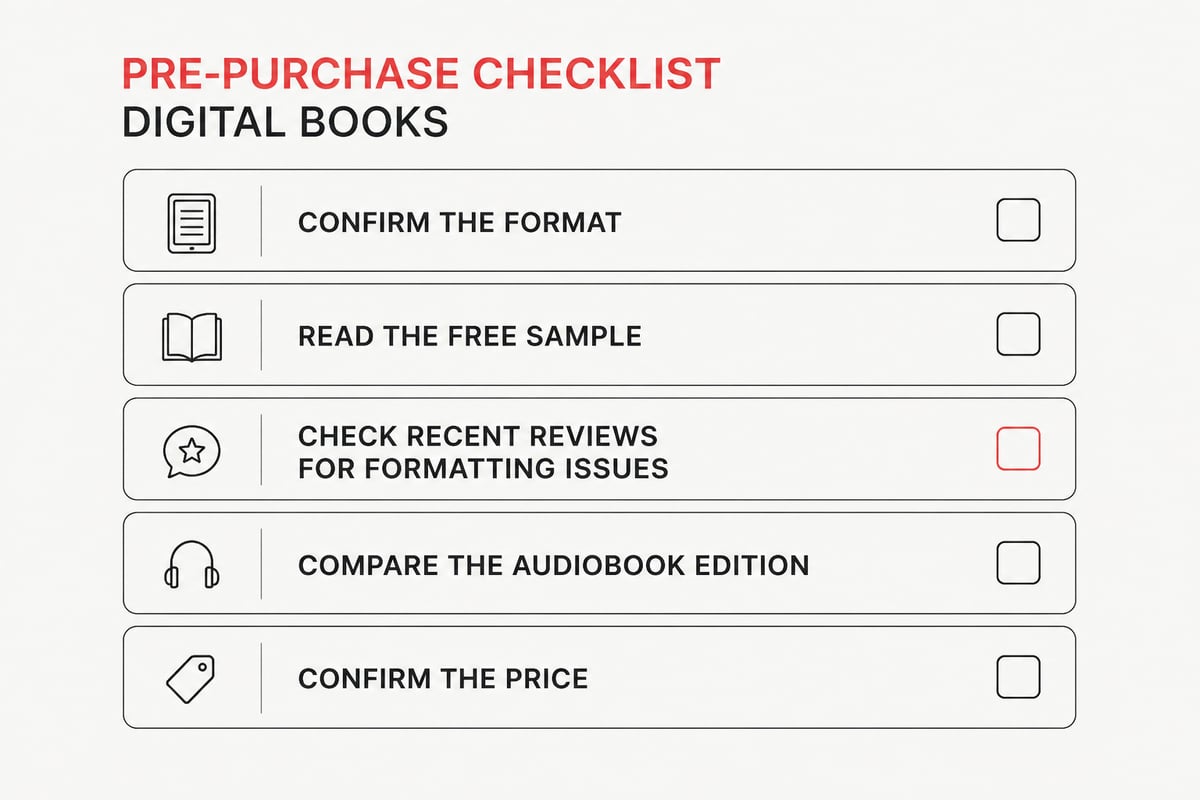
A good purchase starts with a good search, and a sample chapter is the best filter before you spend. Download the free sample on any Kindle listing and read the first pages to judge the writing and the formatting.
A few habits help:
- Check the edition: Make sure the listing is the full book and not a study guide or summary with a similar title.
- Read recent reviews: They often flag formatting problems such as broken tables or missing images.
- Compare formats: If you like to listen, look at the audiobook edition and the Kindle edition together.
- Browse by genre: Fiction, business, comics and biographies each have their own bestseller lists.
For ideas on what to read, Tell eBook's curated lists include the best audiobooks of 2026 and Emily Henry's books. Fans of long-form fantasy may enjoy Frank Herbert's Dune saga collection, and readers who like narrative nonfiction can look at Digital Hustlers.
Troubleshooting a Purchase That Does Not Arrive
If a purchased book does not appear on your device, the cause is almost always a sync or account issue, not a failed order. Work through these checks in order:
- Confirm the order in your Amazon account under Your Orders. A completed order with a charge means the purchase succeeded, and the problem lies with delivery to the device.
- Make sure the device is connected to Wi-Fi. A Kindle in airplane mode or on a weak connection will not pull new titles, so toggle the connection and try again.
- Open the Kindle library and use the sync option. On some devices the new title appears under the "Cloud" or "All" view rather than "Downloaded," and tapping it starts the download.
- Verify that the device is registered to the same Amazon account used for the purchase. This is the most frequent cause for households with more than one account, where a book bought under one login never reaches a device signed in under another.
- Check the "Deliver to" setting on the book's order record and resend it to the correct device. If you chose a different device at checkout, the book is waiting there.
Restarting the device or the app after syncing resolves many remaining cases. If the problem continues, contact Amazon customer service with your order number so they can trace the delivery.
Readers Who Want Print Should Look Elsewhere
Digital purchases suit readers who value instant access and portability. If you want a physical, printed copy shipped to your door, a digital store is not the right fit, and a print retailer will serve you better. That applies to a few clear situations: a book you plan to give as a gift, a title with large photographs or fold-out illustrations that read poorly on a small screen, or a reference book you want to flip through and annotate by hand. Print also suits anyone who wants to lend a copy freely to a friend without worrying about accounts, devices or publisher lending rules. For everyone who reads on a screen or listens on a phone, buying digitally means no shipping, no storage and a library that travels with you. A single phone can hold hundreds of titles, and a purchase is available the moment payment clears, which matters when you want a book for a flight that leaves tonight rather than one that arrives next week.
Readers across Puerto Rico who follow local news through NewsPR will recognize the same advantage: information and stories, available the moment you want them, on whichever device is closest.
Building a Library You Can Keep
Whichever store you use, treat your library as something worth maintaining. Start with a simple record of where each purchase lives: a short note listing the title, the store and the format (Kindle or EPUB) is enough to tell you later which books are tied to an Amazon account and which sit on your own devices. Back up open-format files to a computer or cloud folder, since an EPUB you hold yourself cannot disappear from a store catalog. Review your account settings once or twice a year, including the payment method attached to 1-Click and the list of devices registered to your Amazon account, and remove any device you no longer use. Mixing a Kindle account with an open-format store lets you use Amazon's accessibility tools, such as Assistive Reader's read-aloud with real-time highlighting, while keeping part of your collection portable. A practical split is to buy titles you want to hear while following the text inside Kindle, and buy everything you want to move between a Kobo, a Nook and a phone as EPUB. If you want help finding your next title, Tell eBook's find your books page and its guide to reading more books are a practical place to start.
Open your Amazon account today, review your 1-Click and password settings, and note which of your purchases are locked to Kindle devices. If you want your next purchases in an open format at lower prices, go to the Tell eBook shop and browse bestselling eBooks and audiobooks that download instantly and work on Kobo, Nook, phones and tablets.