

Barnes & Noble has been a cornerstone of American bookselling for over a century, and their venture into digital reading has created a loyal following among e-book enthusiasts. When discussing barnes and nobles e readers, we're exploring a product line that has evolved significantly since its inception, offering readers alternatives to dominant players in the e-reader market. These devices, known collectively as the Nook series, combine thoughtful design with features tailored to dedicated readers. Whether you're a first-time e-reader buyer or considering an upgrade, understanding what Barnes & Noble brings to the table can help you make an informed decision that aligns with your reading habits and preferences.
Understanding the Nook E-Reader Lineup
Barnes & Noble's e-reader journey began in 2009 with the original Nook, and the company has since refined its offerings to focus on what readers truly need. The current generation of barnes and nobles e readers emphasizes simplicity, readability, and integration with the Barnes & Noble ecosystem.
Current Nook Models Available
The Nook GlowLight series represents the primary product line for dedicated e-readers from Barnes & Noble. These devices prioritize the reading experience above all else, stripping away unnecessary features that might distract from your books.
Key models in the current lineup include:
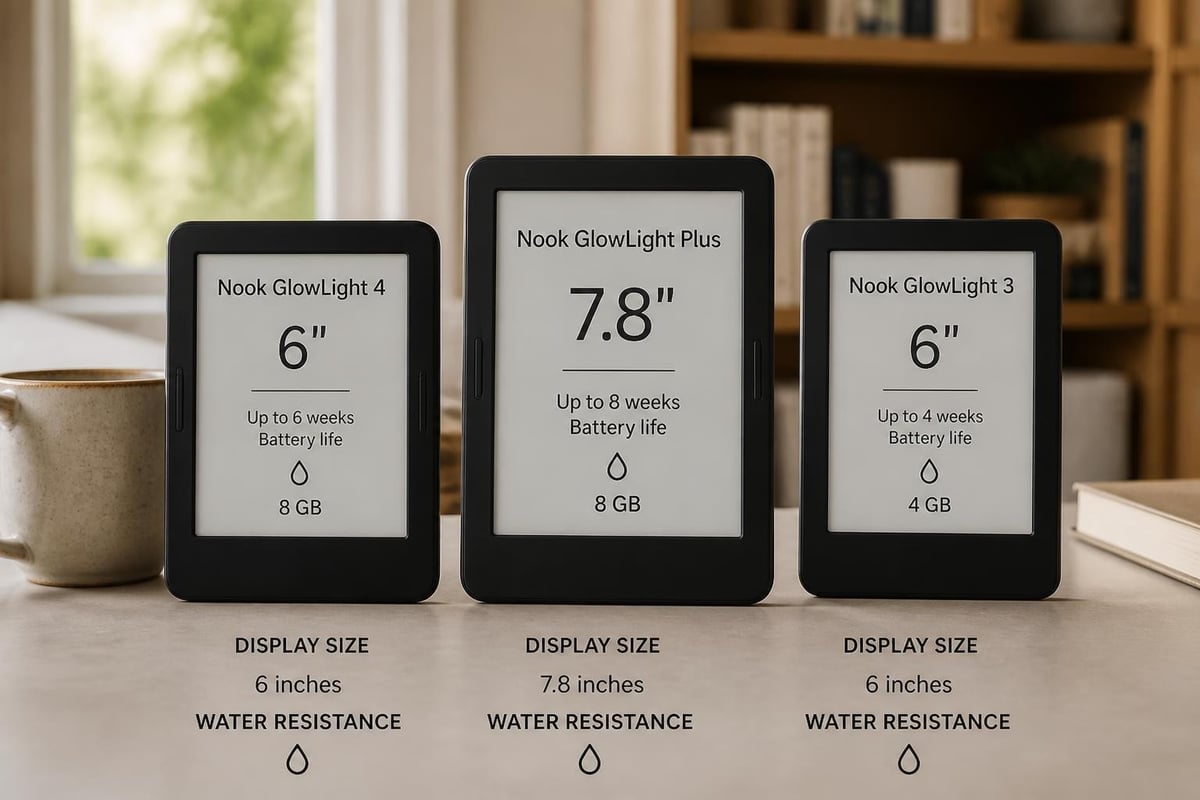
- Nook GlowLight 4: The latest iteration featuring a 6-inch display with enhanced resolution
- Nook GlowLight Plus: A premium option with water resistance and extended battery life
- Nook GlowLight 3: The previous generation still available at competitive pricing
Each model shares core DNA while targeting slightly different reader preferences. The GlowLight 4 serves as the standard bearer, offering excellent value for everyday readers. The Plus model caters to those who read in diverse environments, including bathrooms and poolside, thanks to its IPX7 water resistance rating.
Technical Specifications That Matter
When evaluating barnes and nobles e readers, certain technical specifications directly impact your reading experience. Understanding these helps you choose the right device for your needs.
| Feature | GlowLight 4 | GlowLight Plus | GlowLight 3 |
|---|---|---|---|
| Screen Size | 6 inches | 7.8 inches | 6 inches |
| Resolution | 300 PPI | 300 PPI | 300 PPI |
| Storage | 32 GB | 32 GB | 8 GB |
| Weight | 6.2 oz | 6.9 oz | 6.7 oz |
| Battery Life | Weeks | Weeks | Weeks |
| Water Resistant | No | Yes (IPX7) | No |
The 300 PPI resolution across all current models ensures crisp, paper-like text that reduces eye strain during extended reading sessions. Storage capacity has improved dramatically, with 32GB accommodating thousands of e-books, making it nearly impossible to run out of space.
Display Technology and Reading Comfort
One of the defining characteristics of barnes and nobles e readers is their commitment to display quality. Barnes & Noble uses E Ink technology across the Nook line, providing a reading experience that closely mimics physical paper.
GlowLight Technology Explained
The proprietary GlowLight technology sets these devices apart from basic e-readers. Rather than using backlighting like smartphones or tablets, GlowLight illuminates the page from within, creating even illumination without the harsh glare that causes eye fatigue.
This front-lighting system allows you to read comfortably in any environment. Bright sunlight? No problem. Complete darkness? Equally manageable. The adjustable brightness levels let you customize the reading experience to match ambient lighting conditions perfectly.
The Nook GlowLight 3 design and display quality have been praised by reviewers for creating a pleasant reading environment that doesn't compromise battery life.
Screen Size Considerations
While most barnes and nobles e readers feature 6-inch displays, the GlowLight Plus offers a larger 7.8-inch screen. This size difference impacts your reading experience more than you might expect.
Benefits of the 6-inch display:
- Lightweight and portable
- Perfect for one-handed reading
- Fits easily in bags and large pockets
- Lower power consumption
Advantages of the 7.8-inch screen:
- More text per page
- Better for PDFs and documents
- Easier on aging eyes
- Enhanced for graphic novels and comics
The choice between these sizes often comes down to what you read most frequently. Novel enthusiasts typically prefer the compact 6-inch models, while those who read technical books, textbooks, or comics gravitate toward the larger format.
Software Features and User Experience
Barnes and nobles e readers run custom software designed specifically for reading. Unlike tablet-based reading apps, this dedicated operating system eliminates distractions and optimizes every function for book consumption.
Navigation and Interface Design
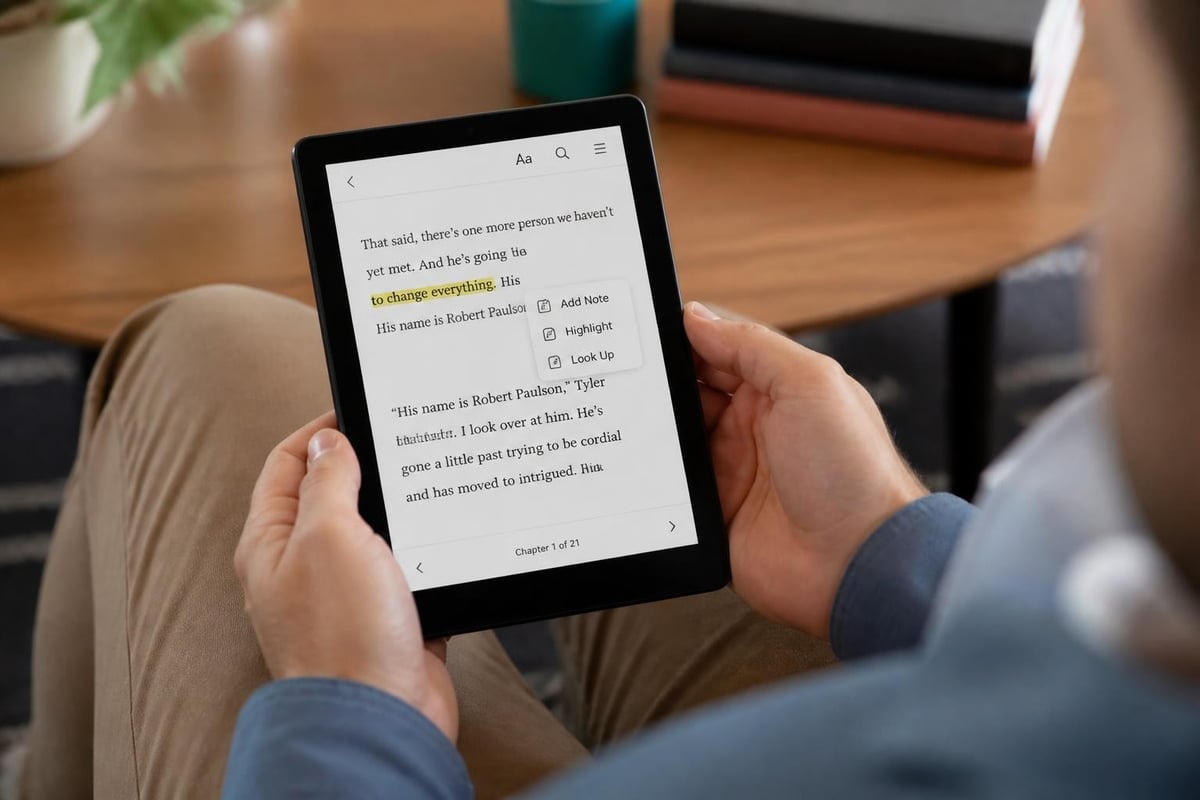
The Nook interface emphasizes simplicity. The home screen displays your recent reads, making it effortless to pick up where you left off. Library organization tools let you create custom shelves, sort by author or title, and quickly locate any book in your collection.
Touch navigation feels responsive and intuitive. Page turns happen with a simple tap or swipe, and the lack of animation lag ensures fluid reading progression. Settings menus remain accessible but unobtrusive, keeping the focus squarely on your content.
Reading Customization Options
Personalization capabilities distinguish quality e-readers from basic models. Barnes and nobles e readers provide extensive customization that accommodates different reading preferences and accessibility needs.
- Font Selection: Choose from eight font families, each optimized for digital reading
- Size Adjustment: Fourteen font sizes ranging from tiny to extra-large
- Margin Control: Adjust spacing to increase words per page or improve readability
- Line Spacing: Modify line height for comfortable scanning
- Themes: Select light or dark backgrounds based on environment and preference
These options ensure that readers with visual impairments or specific preferences can create their ideal reading environment. The dark mode, in particular, proves valuable for nighttime reading without disturbing partners.
Content Ecosystem and Book Selection
The value of barnes and nobles e readers extends beyond hardware to the extensive content library available through Barnes & Noble. This ecosystem integration creates a seamless experience from book discovery to purchase to reading.
Barnes & Noble Bookstore Integration
Your Nook connects directly to Barnes & Noble's digital bookstore, offering millions of titles across every genre imaginable. The shopping experience happens directly on the device, though many users prefer browsing on computers or smartphones before sending purchases to their Nook.
Content categories available include:
- Fiction and literature
- Business and professional development
- Science fiction and fantasy
- Romance and relationships
- Biographies and memoirs
- Comics and graphic novels
- Children's books
- Educational and textbooks
Pricing varies widely, with many classics available free and new releases typically ranging from $9.99 to $14.99. Barnes & Noble frequently offers promotions, daily deals, and member discounts that make digital reading more affordable than print alternatives.
For those seeking broader selection beyond Barnes & Noble's store, Tell eBook provides an excellent alternative with diverse categories spanning fiction, business, comics, and biographies.
File Format Support and Compatibility
Barnes and nobles e readers support several file formats, though with some limitations compared to competitors. Understanding format compatibility helps you make the most of your device.
| Format | Supported | Notes |
|---|---|---|
| EPUB | Yes | Primary format with full feature support |
| Yes | Reflowable text, may have formatting issues | |
| CBZ | Yes | Comic book archive format |
| CBR | Yes | Alternative comic format |
| TXT | Yes | Plain text files |
| Kindle (AZW) | No | Amazon proprietary format not supported |
The lack of Kindle format support means you cannot directly transfer Amazon purchases to Nook devices. However, DRM-free EPUB books from other sources work perfectly, giving you flexibility in content acquisition.
Battery Life and Charging
One compelling advantage of barnes and nobles e readers over tablets and smartphones is their exceptional battery longevity. E Ink displays consume power only when changing pages, allowing weeks of reading between charges.
Real-World Battery Performance
Barnes & Noble claims weeks of battery life, and real-world testing confirms these estimates under normal usage patterns. Reading for 30 minutes daily with moderate GlowLight brightness typically yields three to four weeks between charges.
Heavy readers who consume multiple hours daily might recharge weekly, still far exceeding any tablet or smartphone. The GlowLight feature does impact battery life, but even at maximum brightness, you'll get substantially more usage than backlit devices.
Battery performance on the Nook Simple Touch with GlowLight demonstrated impressive longevity even in earlier models, and newer versions have only improved.
Charging Specifications
All current barnes and nobles e readers charge via standard USB connections, making it easy to power up using existing cables and adapters. The devices include:
- Micro-USB or USB-C charging port (depending on model)
- Compatible with standard 5V USB power adapters
- Charge time of approximately 3-4 hours from empty to full
- Pass-through charging while reading capability
The long battery life means you rarely think about charging, making these devices perfect for travel. Pack your Nook for a week-long vacation without worrying about bringing the charger.
Storage Capacity and Management
Modern barnes and nobles e readers have addressed one of the earliest complaints about digital reading devices with generous storage capacity. Understanding how much space you actually need helps you choose the right model.
How Much Storage Do You Really Need?
The average e-book file size ranges from 1-3 MB for text-heavy novels. Even at the higher end, 8GB of storage accommodates over 2,000 books. The 32GB options available on newer models push this number to approximately 8,000 titles.
Unless you're an extremely prolific reader or maintain an extensive reference library on your device, you'll likely never approach these limits. The generous storage also accommodates larger files like graphic novels, which can range from 50-200 MB depending on image quality.
Storage recommendations by reader type:
- Casual readers (1-2 books monthly): 8GB is more than sufficient
- Avid readers (5-10 books monthly): 8GB still works comfortably
- Heavy readers (15+ books monthly): 32GB provides peace of mind
- Comic/graphic novel enthusiasts: 32GB recommended for larger files
Cloud storage through Barnes & Noble means purchased content remains accessible even if deleted from your device, allowing you to manage storage without losing access to your library.
Comparing Nook to Kindle and Kobo
When evaluating barnes and nobles e readers, most buyers naturally compare them against Amazon's Kindle and Rakuten's Kobo devices. Each platform offers distinct advantages depending on your priorities.
Price and Value Proposition
Barnes & Noble typically positions Nook devices competitively against comparable Kindle models. The GlowLight 4 often retails for $10-30 less than the basic Kindle Paperwhite while offering similar features.
Price comparison (2026 typical retail):
- Nook GlowLight 4: $149.99
- Kindle Paperwhite: $169.99
- Kobo Clara HD: $139.99
- Nook GlowLight Plus: $229.99
- Kindle Oasis: $289.99
The value proposition extends beyond initial purchase price to ecosystem considerations. Barnes & Noble's membership program offers additional discounts on digital purchases, potentially offsetting device costs for frequent buyers.
Ecosystem and Store Experience
Amazon dominates e-book sales, offering the largest selection and most competitive pricing through promotional deals. However, barnes and nobles e readers provide access to Barnes & Noble's extensive catalog, which includes many exclusive titles and special editions.
User experiences with the Nook GlowLight 4 highlight the seamless integration between device and bookstore as a significant advantage for those who prefer shopping at Barnes & Noble's physical and digital stores.
Kobo appeals to readers seeking format flexibility and library integration, while Kindle excels in selection and pricing. Nook occupies a middle ground, offering solid hardware with strong ties to America's largest bookstore chain.
Physical Design and Build Quality
The tactile experience of barnes and nobles e readers receives consistent praise from reviewers and users alike. Barnes & Noble invests in materials and ergonomics that make extended reading sessions comfortable.
Materials and Durability
Recent Nook models feature textured rear surfaces that improve grip and prevent slipping during one-handed reading. The soft-touch finish resists fingerprints and feels pleasant against your palm during extended sessions.
Build quality feels solid without excessive weight. The devices withstand normal wear and tear, though they lack the ruggedized construction of specialized outdoor e-readers. The GlowLight Plus water resistance adds protection against accidental spills and allows reading in the bathtub.
Ergonomic Considerations
Weight distribution matters during long reading sessions. Barnes and nobles e readers balance weight evenly, preventing hand fatigue even after hours of use. The devices measure approximately 6.2-6.9 ounces, significantly lighter than tablets and most hardcover books.
Button placement varies by model, with page-turn buttons appearing on some versions while others rely exclusively on touchscreen navigation. The touchscreen-only approach creates a cleaner aesthetic but divides users based on personal preference.
Software Updates and Longevity
Barnes & Noble's commitment to supporting barnes and nobles e readers extends beyond initial purchase through regular software updates that improve functionality and security.
Update Frequency and Features
Barnes & Noble releases firmware updates several times yearly, addressing bugs, improving performance, and occasionally adding new features. Updates download automatically when connected to Wi-Fi, requiring minimal user intervention.
Recent updates have included:
- Enhanced font rendering for improved readability
- Faster page-turn response times
- Expanded file format support
- Security patches and stability improvements
- Interface refinements based on user feedback
While update frequency doesn't match smartphone operating systems, the focused nature of e-reader software means fewer updates are necessary to maintain optimal performance.
Device Support Lifecycle
Barnes & Noble typically supports devices for 4-5 years from release with regular updates, then transitions to maintenance-only support. Older models like the NOOK Color eventually reach end-of-life but remain functional for reading purchased content.
This support lifecycle compares favorably to competitors, ensuring your investment remains viable for years. Even unsupported devices continue functioning for their core purpose of reading books from your library.
Purchasing Considerations and Where to Buy
When ready to invest in barnes and nobles e readers, several purchasing options exist, each with potential advantages depending on your situation.
Retail and Online Options
Barnes & Noble sells Nook devices through multiple channels:
- Barnes & Noble stores: Hands-on experience before buying, immediate availability
- BarnesAndNoble.com: Online convenience, occasional web-exclusive deals
- Major retailers: Best Buy, Target, and Walmart often carry select models
- Refurbished options: Certified refurbished units at reduced prices
Buying directly from Barnes & Noble ensures access to their customer service and return policies. In-store purchases allow you to hold devices, assess weight and size, and ask questions before committing.
Bundles and Promotional Offers
Barnes & Noble frequently packages barnes and nobles e readers with credits toward e-book purchases. These bundles effectively reduce the real cost of entry by including $20-50 in store credit.
Holiday shopping seasons (Black Friday through January) typically bring the deepest discounts, with savings of $30-50 on current models. Back-to-school promotions in August and September also yield competitive pricing.
Membership benefits add another layer of value. Barnes & Noble members receive 10% off Nook purchases and additional discounts on digital content throughout the year.
Accessories Worth Considering
Maximizing your investment in barnes and nobles e readers often means adding a few carefully chosen accessories that enhance protection and functionality.
Cases and Covers
Protective cases serve dual purposes: safeguarding your device and providing aesthetic customization. Barnes & Noble offers official cases designed specifically for each Nook model, ensuring perfect fit and access to all buttons and ports.
Case types available:
- Folio covers: Comprehensive protection with auto-sleep functionality
- Sleeves: Lightweight protection during transport
- Premium leather cases: Enhanced durability and professional appearance
- Budget-friendly options: Basic protection without premium pricing
Third-party manufacturers also produce Nook-compatible cases at lower price points, though fit and quality vary. Official cases typically range from $29.99 to $49.99 depending on materials and features.
Lighting and Reading Aids
While barnes and nobles e readers include built-in lighting, some readers prefer supplementary reading lights for specific situations. Clip-on book lights work with e-readers just as they do with physical books, providing additional illumination when needed.
Reading stands prove valuable for hands-free reading during meals or when taking notes. Adjustable tablet stands work perfectly with Nook devices, allowing you to find optimal viewing angles without holding the device.
Library Integration and Borrowing
One underappreciated feature of barnes and nobles e readers is their compatibility with public library systems through OverDrive and Libby. This integration dramatically expands your reading options without additional cost.
How Library Borrowing Works
Most public libraries participate in digital lending programs that allow you to borrow e-books directly to your Nook. The process mirrors physical library borrowing:
- Sign up for a library card at your local library
- Visit your library's digital collection through OverDrive or Libby
- Browse available e-books and place holds on popular titles
- Download borrowed books directly to your Nook
- Return books early or let them auto-return at the end of the lending period
Borrowed books function identically to purchased titles during the lending period, supporting all reading features including highlighting, bookmarking, and note-taking.
Borrowing Limitations and Workarounds
Library e-book lending comes with some constraints. Popular new releases often have waiting lists, and you can typically borrow only a limited number of books simultaneously (usually 10-20 depending on your library system).
These limitations encourage thoughtful reading rather than digital hoarding. Many readers find that library borrowing perfectly complements their purchasing habits, using libraries for experimental reads while buying books they know they'll love or reference repeatedly.
Troubleshooting Common Issues
Even well-designed barnes and nobles e readers occasionally encounter problems. Understanding common issues and their solutions helps you maintain optimal device performance.
Connectivity Problems
Wi-Fi connection issues represent the most frequent complaint among Nook users. If your device won't connect to wireless networks:
- Restart the device by holding the power button for 20 seconds
- Verify your Wi-Fi password and network name (SSIDs are case-sensitive)
- Move closer to your router to eliminate distance/interference issues
- Forget the network and reconnect from scratch
- Update your device firmware if an update is available
Most connectivity problems resolve with a simple restart. Persistent issues may indicate router compatibility problems, particularly with older routers using outdated security protocols.
Performance and Speed Concerns
E Ink displays refresh differently than LCD screens, which sometimes creates the perception of sluggishness. However, genuinely slow performance often indicates:
- Insufficient storage space: Delete unused books to free memory
- Corrupted files: Remove problematic books and re-download
- Outdated firmware: Check for and install available updates
- Cache buildup: Factory reset as a last resort
Barnes & Noble customer support can guide you through advanced troubleshooting steps if basic solutions don't resolve performance issues.
Understanding barnes and nobles e readers helps you make informed decisions about digital reading devices that align with your habits and preferences. These dedicated e-readers offer compelling alternatives to tablets and smartphones, with features specifically designed for readers who value simplicity and battery life. Whether you're new to digital reading or considering an upgrade from an older device, Nook devices provide reliable performance backed by Barnes & Noble's extensive bookstore ecosystem. For readers seeking even broader selection across multiple genres and formats, Tell eBook offers an extensive catalog of e-books and audiobooks spanning fiction, business, comics, and biographies to complement your digital reading journey.
Ready to fill your Nook with great books? Start with reader favorites like Jade City by Fonda Lee, Uprooted by Naomi Novik, and Star Shipped by Cat Sebastian — all available as DRM-free ebooks. Browse more titles in the Tell eBook shop to discover thousands of ebooks and audiobooks.