

The digital reading landscape has evolved dramatically over the past decade, with dedicated e-readers becoming essential tools for book lovers worldwide. Among the prominent players in this space, the barnes and noble e reader, marketed under the Nook brand, has carved out a significant presence since its introduction in 2009. These devices offer readers an alternative to Amazon's Kindle ecosystem, providing unique features and direct integration with one of America's most recognizable bookstore chains. Understanding the capabilities, compatibility, and practical applications of these devices helps readers make informed decisions about their digital library investments.
Evolution of the Barnes and Noble E Reader
The barnes and noble e reader journey began when the company recognized the growing demand for digital reading solutions. The original Nook launched with the vision of combining traditional bookselling expertise with modern technology. Over subsequent years, Barnes & Noble introduced multiple iterations, each addressing user feedback and technological advancements.
Key Models and Their Distinctions
The Nook family includes several distinct models designed for different reading preferences and budgets. The Nook Simple Touch with GlowLight, one of the earlier innovations, introduced built-in illumination that allowed readers to enjoy books in various lighting conditions without external light sources. This feature set it apart from competitors and received praise for its ergonomic design.
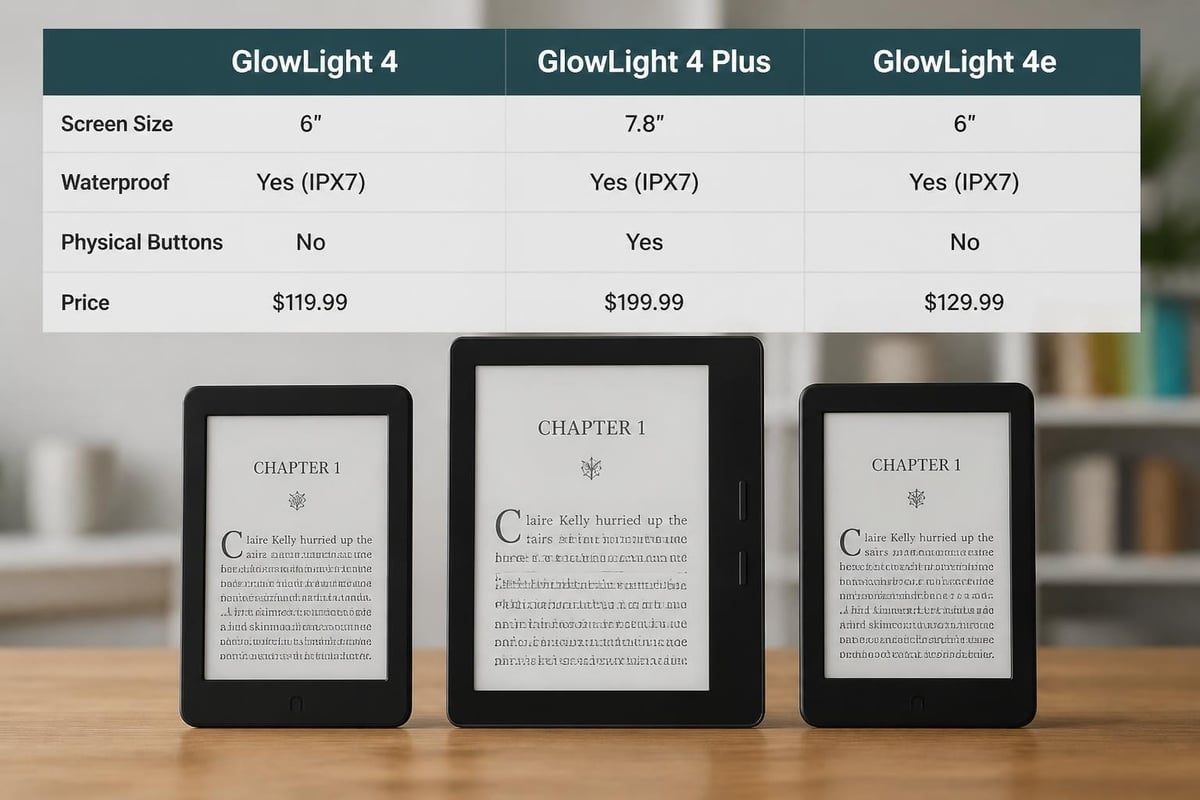
More recent releases include the Nook GlowLight 4 Plus, which expanded the screen to 7.8 inches and added waterproof capabilities. According to WIRED’s comprehensive review, this model represents Barnes & Noble's commitment to premium features including physical page-turn buttons that many readers prefer over touch-only navigation.
The company also introduced the Nook GlowLight 4e as an affordable entry point designed to compete directly with budget-friendly Kindle models while maintaining quality reading experiences.
| Model | Screen Size | Waterproof | Physical Buttons | Target Audience |
|---|---|---|---|---|
| GlowLight 4e | 6 inches | No | No | Budget-conscious readers |
| GlowLight 4 | 6 inches | No | Yes | Standard users |
| GlowLight 4 Plus | 7.8 inches | Yes | Yes | Premium readers |
Technical Specifications and Display Technology
The barnes and noble e reader devices utilize E-Ink Pearl technology, which provides several advantages for extended reading sessions. This display technology mimics the appearance of actual printed paper, reducing eye strain compared to backlit LCD screens found in tablets and smartphones.
Display Benefits:
- Paper-like reading experience with minimal glare
- Extended battery life lasting weeks instead of hours
- Visibility in direct sunlight
- GlowLight technology for reading in darkness
The E-Ink display operates differently than traditional screens by only consuming power when changing pages. This fundamental difference explains why a single charge on a barnes and noble e reader can last several weeks with moderate daily use.
Resolution and Reading Comfort
Modern Nook devices feature 300 PPI (pixels per inch) resolution on most models, matching industry standards for crisp text rendering. This pixel density ensures that even small fonts appear sharp and readable. The anti-glare screen coating further enhances readability by minimizing reflections from ambient lighting.
Users can customize font sizes, typefaces, margins, and line spacing to match personal preferences. These adjustments make the reading experience accessible for individuals with varying visual needs.
File Format Compatibility and Content Sources
Understanding which file formats work with your barnes and noble e reader helps maximize your digital library. Nook devices natively support EPUB, the industry-standard format for e-books, giving readers access to content from multiple sources beyond Barnes & Noble's ecosystem.
Supported Formats
- EPUB (with and without DRM)
- PDF documents
- CBZ comic book archives (on select models)
- Image files (JPEG, GIF, PNG, BMP)
This broad compatibility means readers can access content from various platforms, including Tell eBook’s extensive collection of e-books across diverse categories. The platform offers titles in multiple genres, from business and finance to biography and memoir, all readable on compatible devices.
Managing Digital Rights
Books purchased from Barnes & Noble come with their proprietary DRM (Digital Rights Management), while library books typically use Adobe DRM. Understanding these protection systems helps readers manage their collections effectively. The Nook supports Adobe Digital Editions, enabling borrowing from thousands of public libraries that participate in OverDrive and similar services.
For DRM-free content, readers enjoy complete flexibility in organizing and transferring their files. Many independent publishers and authors distribute books without restrictions, and these titles work seamlessly on the barnes and noble e reader platform.
Navigation and User Interface
The reading interface on Nook devices prioritizes simplicity and distraction-free engagement with content. Basic navigation involves tapping or swiping to turn pages, with additional options accessible through menu systems.
Primary Navigation Methods:
- Touch screen tapping for page turns
- Physical buttons (on equipped models)
- Swipe gestures for menu access
- Dictionary lookup through word selection
- Bookmarking and highlighting capabilities
The home screen organizes your library with various sorting options including recent reads, title, author, and custom collections. Creating collections helps manage large libraries by grouping related titles, such as organizing business-focused content separately from leisure reading.
Battery Performance and Charging
Battery longevity represents one of the most appealing aspects of the barnes and noble e reader experience. Unlike tablets that require daily charging, E-Ink devices maintain power for extended periods.
| Usage Pattern | Expected Battery Life |
|---|---|
| 30 minutes daily reading | 4-6 weeks |
| 1 hour daily reading | 2-3 weeks |
| Heavy use (2+ hours daily) | 1-2 weeks |
| Standby (no use) | Several months |
Several factors influence actual battery performance including GlowLight brightness, wireless connectivity usage, and page-turn frequency. Disabling Wi-Fi when not actively downloading content significantly extends battery life since the device doesn't continuously search for network connections.
Charging occurs through standard micro-USB or USB-C connections depending on the model, with full charges typically completing in two to three hours. Many readers develop the habit of charging their devices monthly regardless of usage, ensuring the reader stays powered for impromptu reading sessions.
Content Acquisition and Library Integration
The barnes and noble e reader ecosystem connects directly to the Barnes & Noble digital bookstore, providing instant access to millions of titles. Browsing, purchasing, and downloading occur directly on the device when connected to Wi-Fi, eliminating the need for computer intermediaries.
Alternative Content Sources
Beyond the primary Barnes & Noble store, readers can acquire compatible content from:
- Public libraries through OverDrive, Libby, and CloudLibrary
- Independent e-book retailers selling DRM-free EPUB files
- Project Gutenberg for classic literature in the public domain
- Author websites offering direct sales
- Platforms like Tell eBook providing diverse categories including art and architecture and biological sciences
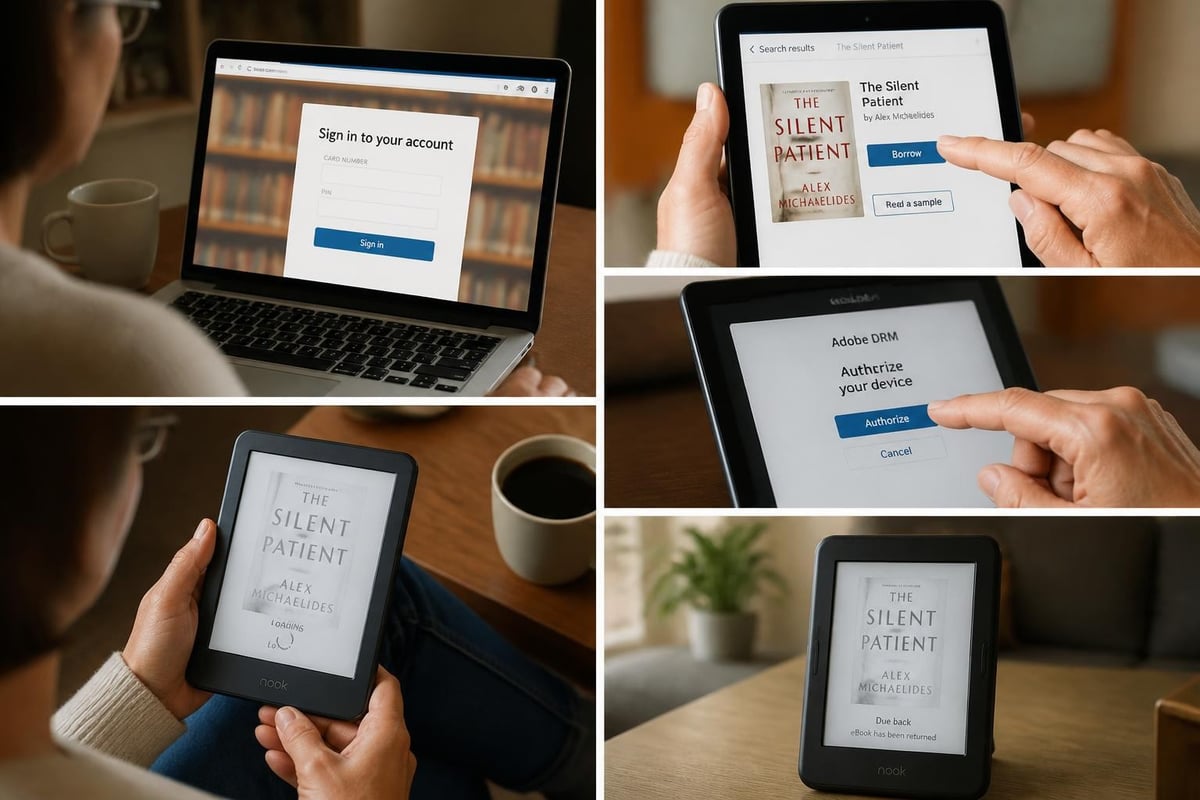
Transferring sideloaded content requires connecting the device to a computer via USB cable. The Nook appears as an external drive, allowing users to drag and drop compatible files into the appropriate folders. This method works particularly well for DRM-free purchases from multiple retailers.
Reading Features and Customization
Modern barnes and noble e reader devices include features designed to enhance the reading experience beyond simple page display. These tools help readers engage more deeply with content and personalize their interaction with books.
Advanced Features:
- Built-in dictionary with word definitions
- Highlighting passages for later reference
- Note-taking capabilities
- Reading statistics and progress tracking
- Adjustable font weights and styles
- Night mode with inverted colors
The GlowLight technology deserves particular attention for its thoughtful implementation. Unlike backlighting that shines into readers' eyes, the GlowLight illuminates the page surface itself, creating a more natural reading experience similar to a bedside lamp illuminating a physical book.
Storage Capacity and Cloud Services
Internal storage on Nook devices typically ranges from 8GB to 32GB depending on the model. While this might seem modest compared to modern smartphones, it translates to thousands of books given that most EPUB files occupy only 1-2MB of space.
The actual storage breakdown allocates space for:
- Operating system and firmware
- User-accessible storage for books
- System cache and temporary files
Barnes & Noble provides cloud storage for all purchases, meaning your entire library remains accessible even if you remove titles from the device. This approach allows readers to maintain extensive collections while keeping only current reads on the physical device.
Durability and Build Quality
The barnes and noble e reader construction varies by model, with premium versions offering enhanced durability features. The GlowLight 4 Plus includes waterproof rating (IPX7), allowing submersion in up to one meter of water for thirty minutes. This protection makes the device suitable for beach reading or bathtub relaxation without anxiety about accidental exposure.
Standard models feature plastic construction that balances weight and durability. The lightweight design, typically around 6-7 ounces, reduces hand fatigue during extended reading sessions. Some users prefer adding protective cases, which provide additional drop protection and functionality like auto-sleep when closed.
Comparison With Competing Platforms
When evaluating the barnes and noble e reader against alternatives, several distinctions emerge beyond simple specification comparisons. The Nook ecosystem offers particular advantages for readers who value EPUB compatibility and prefer supporting traditional bookstore operations.
Ecosystem Considerations
| Factor | Nook | Kindle | Kobo |
|---|---|---|---|
| Primary Format | EPUB | AZW/KFX | EPUB |
| Library Lending | Yes (Adobe DRM) | Limited | Yes (Adobe DRM) |
| Sideloading | Easy | Requires conversion | Easy |
| Retail Integration | Barnes & Noble stores | Amazon online | Rakuten/Walmart |
The Barnes & Noble Nook’s development history reflects the company's commitment to maintaining presence in digital reading despite Amazon's market dominance. This persistence benefits readers who prefer alternatives to single-vendor ecosystems.
Practical Tips for Maximizing Your Device
Optimizing your barnes and noble e reader experience involves understanding both basic functionality and lesser-known features. These strategies help readers get more value from their devices.
Optimization Strategies:
- Organize with collections early before your library becomes unwieldy
- Adjust GlowLight settings for different times of day
- Enable airplane mode when reading to extend battery life
- Regular firmware updates ensure access to latest features and security patches
- Explore font options to find combinations that maximize reading comfort
For readers building extensive digital libraries across multiple genres, creating specific collections for categories like automotive nonfiction or antique and classic works maintains organization and improves discoverability.
Integration With Barnes & Noble Retail Experience
One unique advantage of the barnes and noble e reader involves its connection to physical retail locations. Barnes & Noble stores provide technical support, allow hands-on device testing before purchase, and offer special in-store pricing for members. This hybrid approach combines digital convenience with traditional retail support structures.
Store staff can assist with device setup, troubleshooting, and content recommendations. The membership program provides additional benefits including discounts on device purchases and frequent promotions on e-book content.
Accessibility Features
Modern Nook devices include several features supporting readers with different accessibility needs. Text scaling accommodates visual impairments, while high-contrast modes improve readability for users with specific vision conditions.
The ability to adjust font weights, increase letter spacing, and modify margins creates reading experiences tailored to individual requirements. While dedicated audiobook players offer more robust accessibility features, the barnes and noble e reader provides solid foundation support for many readers.
Future Considerations and Updates
Barnes & Noble continues releasing firmware updates that add features and improve performance on existing devices. These updates typically include bug fixes, security enhancements, and occasional new functionality. Keeping devices updated ensures optimal performance and access to the latest compatibility improvements.
The company's commitment to the Nook platform, despite market challenges, suggests continued support for current devices and potential future innovations. Readers investing in the barnes and noble e reader ecosystem can reasonably expect ongoing software support and content availability.
The barnes and noble e reader provides a capable platform for digital reading with strong EPUB support, excellent battery life, and thoughtful features like GlowLight technology. Whether you're building a collection of business titles or exploring diverse fiction genres, choosing the right device and understanding its capabilities enhances your reading experience. Tell eBook offers thousands of compatible titles across numerous categories, making it easy to build your digital library with content that works seamlessly on your Nook device.
Ready to load great books onto your Nook? Start with reader favorites like Jade City by Fonda Lee, Uprooted by Naomi Novik, and Star Shipped by Cat Sebastian — all available as DRM-free EPUB ebooks. Browse more titles in the Tell eBook shop to discover thousands of ebooks and audiobooks.