

The simplest way to ebook buy online is to pick a store that sells open-format files, compare the price against two or three other sellers, and confirm the book will open on the device you already own. Most readers can complete a purchase in a few minutes, but the choices made at checkout, especially file format and ownership terms, determine whether the book is still usable years from now.
This guide explains where to shop, what to verify before paying, and how to keep the cost of a growing library under control.
Where Can You Buy eBooks Online?
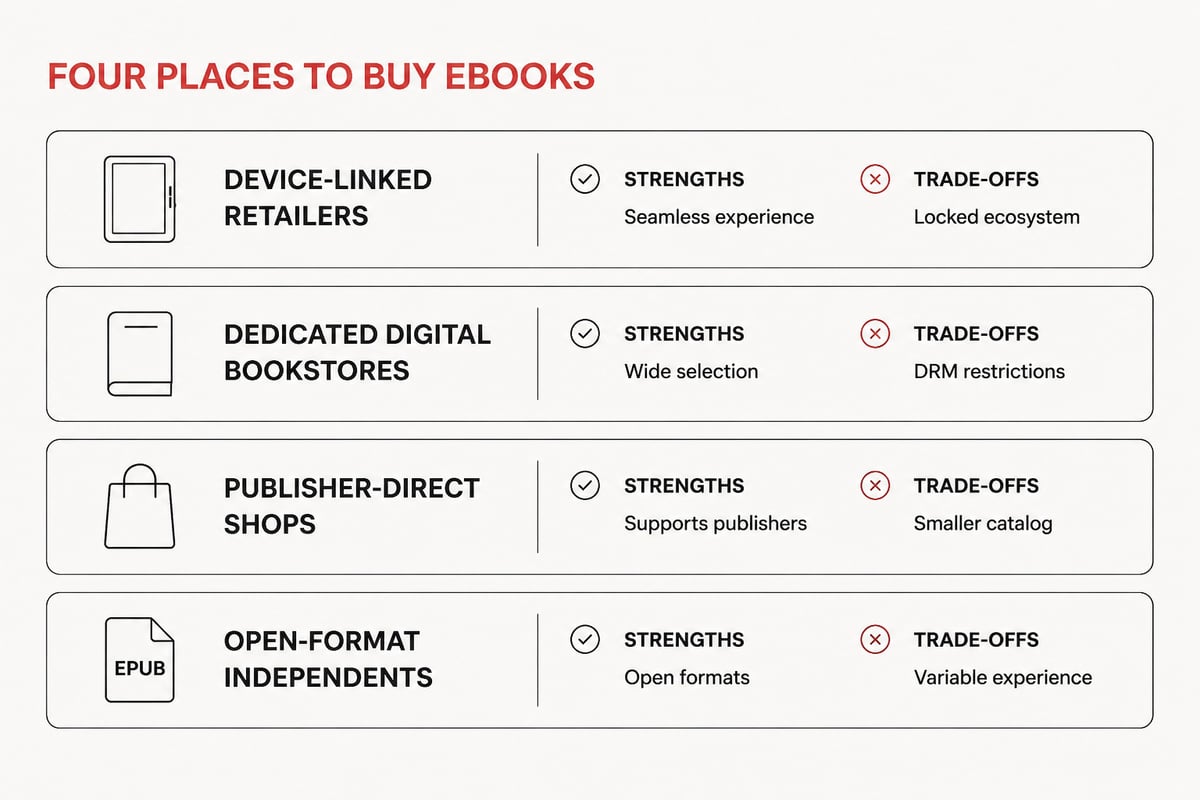
You can buy ebooks from four main types of sellers: general retailers tied to a single reading app, dedicated digital bookstores, publisher-direct shops, and independent stores that sell open-format files. Each has trade-offs in price, selection, and flexibility.
- Device-linked retailers are convenient, but purchases often open only inside that retailer's app or on its hardware.
- Dedicated digital bookstores focus on downloads and usually cover fiction, business, history, and biography in one catalog.
- Publisher-direct shops can offer new releases and sometimes bundles, though selection is limited to that publisher's list.
- Open-format independents deliver standard files you can move between apps and devices.
Tell eBook belongs in the last two categories. It sells eBooks and audiobooks across fiction, business, comics, and biographies, and every title is available for instant download with no shipping fees or waiting. If you want a broader comparison of what to weigh, the page on the best place to buy ebooks walks through the main criteria.
What Is the Best Site to Buy eBooks?
The best site is the one that matches your device, your budget, and your tolerance for being locked into a single app. No single store wins on every measure, so judge candidates against a short checklist rather than a brand name.
Look for these qualities:
- Open file formats. EPUB works across most reading apps and dedicated e-readers.
- Clear ownership terms. You should be able to download the file and keep it.
- Transparent pricing. The price shown should be the price charged, with no hidden fees.
- Catalog depth in your categories. A store strong in thrillers may be thin in business reference.
- Support and account access. Re-downloading a past purchase should be simple.
Readers who want to avoid single-retailer ecosystems can read more about shopping outside them on the page covering how to buy ebooks without Amazon. Those who read on a Kindle device have a separate set of format questions, covered in the guide to buying ebooks for Kindle.
Which File Format Should You Choose?
Choose EPUB whenever it is offered, because it is an open standard supported by most phones, tablets, and e-readers. The format is maintained by the W3C, which published EPUB 3.3 as a Recommendation on March 27, 2025, and the update is backward-compatible with EPUB 3.2, so existing files keep working.
EPUB has practical advantages for daily reading. Its default reflowable layout adapts text to the available screen space, which lets you adjust font size, line spacing, and word spacing to suit your eyes. It also includes a navigation document that reading systems use to build a table of contents, which matters if you are working through a long biography or a business reference book and need to jump between chapters.
PDF is the other common option. It preserves a fixed page layout, which suits textbooks with complex diagrams, but it is harder to read on a small screen. A comparison of EPUB and PDF ebook formats explains how each handles layout and accessibility, which helps you decide by device and reading need.
| Format | Best for | Main limitation |
|---|---|---|
| EPUB | Novels, biographies, business books, phone and tablet reading | Fixed-layout diagrams may display differently |
| Reference material with fixed layouts | Awkward on small screens, no text reflow |
What Should You Check Before You Buy?
Before paying for any ebook, verify five things: the file format, the device compatibility, the ownership terms, the accessibility information, and the total price. A two-minute check prevents most purchasing regrets.
Format and device compatibility
Confirm that the format listed opens on your reading app or e-reader. Titles delivered as EPUB work on Kobo, Nook, phones, and tablets, which is the case for Tell eBook's catalog.
Ownership terms
Check whether the purchase is a file you download and keep or a license that depends on one app. Tell eBook's model is simple: buy once and keep your books forever, then read or listen anywhere.
Accessibility details
EPUB 3.3 recommends that publications conform to EPUB Accessibility requirements, which cover accessibility features and metadata. If you rely on text-to-speech, adjustable fonts, or screen readers, look for accessibility notes on the product page, or contact the store before buying.
Sample and description
A sample chapter or a detailed description shows whether the book suits you. For reference titles, confirm the edition and the publication year, because an older edition of a history or business text may be out of date.
Total price
Look at the final price at checkout. A discounted list price means little if fees appear at the last step. Because digital downloads involve no shipping, the number on the product page should be close to the number you pay.
Where Can You Buy eBooks Online for Cheap?
The cheapest legitimate sources are stores that discount bestsellers as a standing policy, publisher promotions, and library-style free collections for older titles. Prices vary by title and week, so a quick comparison before checkout is worth the effort.
For readers who want bestsellers at lower prices than major retailers, Discount eBooks at Tell eBook lists popular titles with instant EPUB or PDF download. That makes it a practical starting point if you read widely and want to hold down the cost per book.
Some habits keep spending low:
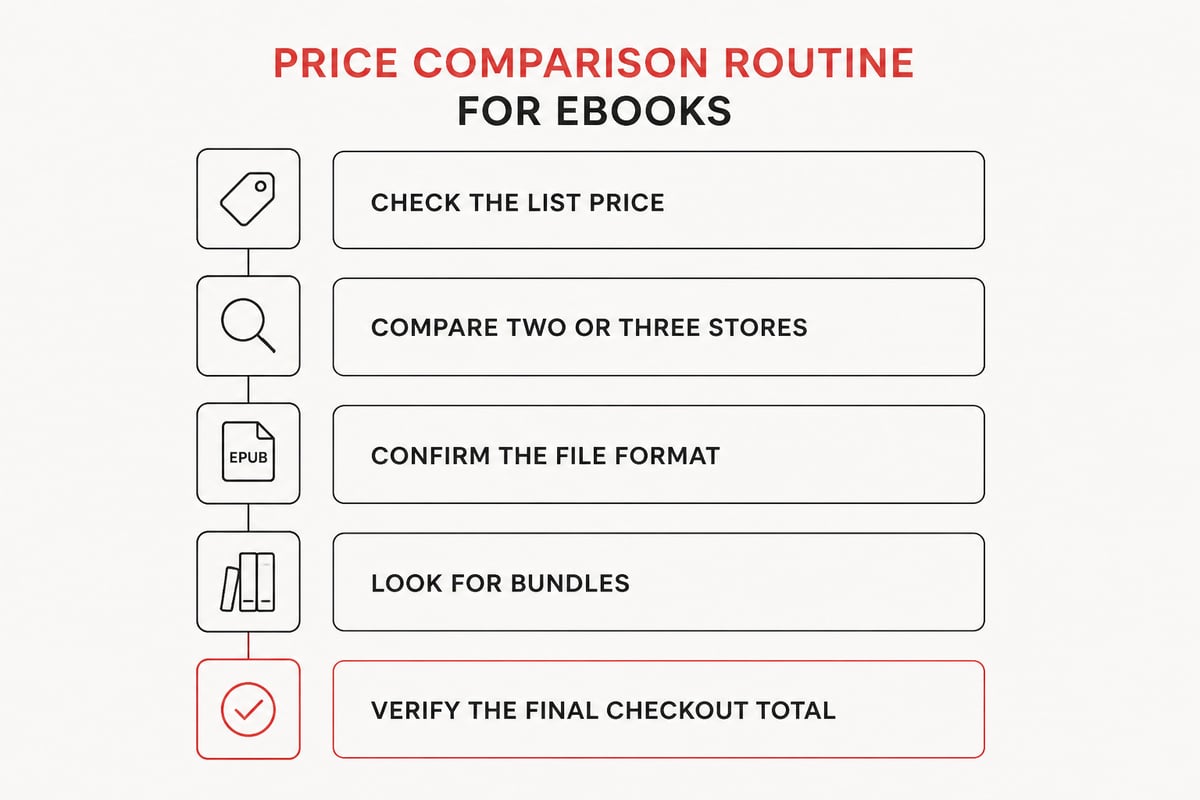
- Compare two or three stores for any title above a few dollars.
- Check older editions for study and reference reading when the newest edition is not required.
- Buy series in bundles where available. A collection such as Frank Herbert’s Dune saga collection, books 1 to 6 can cost less than buying volumes one at a time, though you should confirm the current price on the product page.
- Skip impulse purchases. Keep a wish list and buy in batches when a price drops.
How Do You Build a Reference Library of eBooks?
Build a reference library by choosing a few subject areas, buying core titles in an open format, and organizing files in one place that you control. This approach suits students and self-learners who add books steadily over several years.
Start with categories you will return to. Business readers might begin with biographies of industry figures such as Andrew Carnegie by David Nasaw or Mike Bloomberg: Money, Power, Politics, which pair narrative with lessons in strategy and leadership. History readers can pair period biographies with broader surveys, and art readers can explore artist-focused titles such as Monet: Itinerant of Light.
Students who need course material can look at the collection of eTextbooks before purchasing, and should always confirm the required edition with the instructor or syllabus.
A few organizing habits help:
- Keep the original files. Store downloads in a labeled folder and back it up.
- Name consistently. Author, title, and year make search easy.
- Use your reading app's collections. Group by subject, such as business, history, or biography.
- Add notes as you read. Highlights and bookmarks turn a pile of books into a working reference.
Because EPUB files are reflowable and include a table of contents, they are well suited to this kind of long-term study.
Should You Buy Audiobooks Alongside eBooks?
Yes, if you want to continue a book while commuting, exercising, or doing chores, since pairing the two formats lets you switch between reading and listening without losing your place in the story. Not every title needs both, so decide by how you use the book.
Audiobooks work well for narrative nonfiction and fiction, where the story carries you forward. A long biography is a good example: you might listen to a chapter of Andrew Carnegie by David Nasaw on a drive, then read the same chapter on your phone that evening to reread a passage or take notes. Reference books, textbooks, and anything with tables or diagrams are better read on screen, where the table of contents lets you jump straight to the section you need.
Tell eBook sells both eBooks and audiobooks, so you can build one library in a single account and read or listen anywhere.
Before buying an audiobook, check the narrator, the running time, and whether it is the full text or an abridged version. A sample clip, where offered, tells you more than a description does. Running time also helps you plan: a title that runs many hours suits a commute or a long trip, while a shorter one fits a few evenings of listening. If you already own the eBook, an audiobook of the same title is mainly worth buying when you expect to use it in situations where reading is impractical.
How Do You Complete a Safe eBook Purchase?
A safe purchase follows a repeatable sequence: confirm the seller, review the product details, pay through a standard secure method, and download the file immediately. Following the same steps each time reduces errors.
- Confirm the seller. Look for a clear contact page, readable terms, and a working store catalog. A store that hides its terms or lists no way to reach support deserves a second look before you enter payment details.
- Review the product page. Verify the title, author, edition, and file format. Editions matter most for study and reference titles, where a different printing can change page references and content.
- Check the price at checkout. Make sure it matches what you expected. Digital downloads carry no shipping, so any extra line item should be explained.
- Pay with a secure method and keep the confirmation email. The email is your record of the order and often contains the download link.
- Download and back up the file. Open it once in your reading app to confirm it works, then copy it to a second location such as cloud storage or an external drive.
Opening the file right away also gives you time to report a problem while the order is fresh. Check that the table of contents loads, that the text reflows when you change the font size, and that the cover and chapters display properly.
For questions about specific delivery details, pricing, or account access, use the store's product pages or contact page rather than relying on assumptions. If you are comparing platforms before committing, the guide on buying digital books outside Amazon outlines what changes when you move to an open-format store.
FAQ
Is it better to buy or borrow ebooks?
Buying suits books you plan to reread, annotate, or keep as references, while borrowing suits one-time reads. If you buy from a store that delivers standard files and lets you keep them, the purchase stays yours regardless of future catalog changes.
Can I read an ebook on any device?
It depends on the format. EPUB files open on most phones, tablets, and e-readers through a reading app, while PDFs open almost anywhere but display less comfortably on small screens. Check the format on the product page before buying.
Do I need an e-reader to read ebooks?
No. A phone or tablet with a free reading app is enough for most readers. A dedicated e-reader mainly offers a glare-free screen and longer battery life, which matters if you read for hours at a time.
Before your next purchase, pick one title you have been meaning to read and run it through the checklist above: format, ownership terms, and final price. If you want a store that delivers open-format EPUB files, instant download, and a library you keep forever, browse the catalog and use the shop page to Go to Shop and find your next book at Tell eBook.